Methods
The widget methods are scoped to each widget specifically. The widgets are placed in an array nested within the global Rebuy object so when using methods for a specific widget you can use the Array.find() function (example below) or any other array function that you prefer.
This is not a complete list of the globally available function but the ones that we find most helpful.
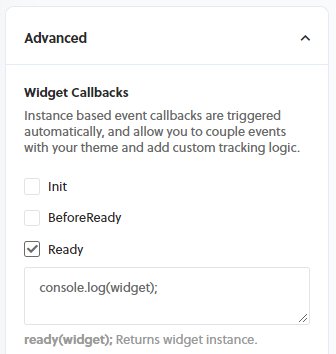
All methods below are as if there is a reference to a specific widget such as the snippet below or if the code snippet is in one of the widget callbacks from the widget settings page under the Advanced settings such as the image below.
addSelectedProductsToCart
This function is used with the Product Add-Ons widget. This adds the items that are selected from the widget to the cart.
addToCart
Makes a post request to Shopify API to add an item to the cart. The first argument expects a product object.
addToReChargeCheckout
Used by the Recharge Checkout widget to add the item object passed in as the first argument and will update the checkout UI.
cartItemIsWidgetItem
Returns a boolean (true) if the item passed in as an argument has been added by the specified widget that is calling the method.
checkout
When this function is called, the customer will be redirected to the checkout page.
compareAtSubtotal
Used by the Dynamic Bundle and Product Addons widgets to generate a compare at price if there is a discount for any of the applicable products
declineOffer
Used by the Upsell, Thanks You Page and Switch to Subscription popup type widgets when the customer does not want to accept the offer from presented.
destroy
This function will destroy and remove the widget, including the root div, at the given index. This function calls hide, detachWidget and unbindEvents.
detachWidget
This function removes the widget from the DOM as well as removes it from the array of widget from window.Rebuy.widgets.
getCartProductIDs
Returns an array of numbers which are the product ID's of the products in the cart.
getCartVariantIDs
Returns an array of numbers which are the variant ID's of the products in the cart.
getVariantIDs
Returns an array of numbers which are the variant ID's of the items in the cart. Take an optional boolean (join) as an argument and when true will join as a comma separated string instead of an array of numbers.
getWidgetProducts
This method will force the widget to fetch new products via the API, and accepts an optional callback function. This is useful if you'd like to update product or variant IDs associated with the widget and then fetch a new API response. In practice, you could update the variant ID based on a customer's interaction with the product page form and fetch variant-specific recommendations.
// Set Shopify variant IDs
widget.data.shopify_variant_ids = [1234567890];

// Fetch new data with the updated variant IDs
widget.getWidgetProducts(()=>{
  console.log("New products fetched!");
});
hasQuantityInputEnabled
Returns a boolean (true) when the widgets quantity input setting is enabled.
hasTimer
Returns a boolean (true) when the widgets timer setting is enabled.
hide
Used by Popup type widgets and will close the widget when this method is called.
isCartBasedWidget
Returns a boolean (true) when the widget is a cart based widget as opposed to a product page widget.
productIsSelected
Used by the Dynamic Bundle and Product Addons widgets. Returns a boolean (true) when the checkbox is selected.
removeFromCart
Original use case: Used by the Shopify checkout and Recharge checkout widget to remove an item from the cart that has been added by the widget. When in checkout, if an item is added by a Rebuy checkout widget then the item will have a (remove) button below it. This way, if the item was added accidentally the customer does not need to navigate back to the cart page to adjust the item that was added.
render
When this method is called and the widget should display based off the connected rules then it will render by creating a new Vue instance for the widget.
selectedProductCount
Used by the Product Addon and Dynamic bundle widget. Returns a number which is the amount of products that are currently selected.
shouldDisplay
Returns a boolean (true) if the widget should display according to the connected data source.
show
This method will make a popup type widget display when it is called. The popup widget can be set to trigger manually via the widgets settings object and then could be triggered to display according to custom logic as needed.
Product & Variant Methods
getProductIDs
Returns an array of Shopify product IDs associated with the widget. Takes an optional boolean argument; when true, returns a comma-separated string instead of an array.
getCollectionIDs
Returns an array of Shopify collection IDs associated with the widget. Takes an optional boolean argument; when true, returns a comma-separated string.
productAvailable
Returns a boolean indicating whether at least one variant of the product is available for purchase.
variantAvailable
Returns a boolean indicating whether a specific variant is available for purchase based on inventory policy and quantity.
variantPrice
Returns the price for a variant, accounting for any widget discounts, subscription discounts, and currency localization. If no variant is provided, uses the lowest-priced variant.
variantCompareAtPrice
Returns the compare-at price for a variant, used to show the original price when a discount is applied.
variantOnSale
Returns a boolean indicating whether a variant is on sale (has a discount or compare-at price higher than current price).
Subscription Methods
hasSubscription
Returns a boolean indicating whether a product has subscription options available.
hasSubscriptionDiscount
Returns a boolean indicating whether a product has a subscription discount configured.
toggleSubscription
Toggles the subscription state of a product. If the product has a subscription and is set to one-time, switches to subscription. If already subscribed, switches to one-time.
selectSubscription
Selects subscription purchase for a product. Optionally accepts a frequency parameter.
selectOnetime
Selects one-time purchase for a product (disables subscription).
Cart Observation
watchCart
Registers an event listener that triggers when the cart changes. Useful for updating widget products when cart contents change. The callback receives the updated products array.
unwatchCart
Removes the cart change event listener registered by watchCart.
cartHasProduct
Returns a boolean indicating whether the cart contains a specific product.
Bundle & Add-On Methods
selectProduct
Used by Dynamic Bundle and Product Add-Ons widgets. Marks a product as selected.
unselectProduct
Used by Dynamic Bundle and Product Add-Ons widgets. Marks a product as unselected.
toggleProductSelect
Toggles the selection state of a product. If selected, unselects it; if unselected, selects it.
subtotal
Used by Dynamic Bundle and Product Add-Ons widgets. Returns the subtotal in cents for all selected products.
bundleOnSale
Returns a boolean indicating whether the bundle has a discount (subtotal is less than compare-at subtotal).
bundleSavings
Returns the savings amount in cents (difference between compare-at subtotal and current subtotal).
--- title: Methods excerpt: JavaScript methods for controlling widget display and cart interactions deprecated: false hidden: false metadata: title: '' description: '' robots: index next: description: '' --- The widget methods are scoped to each widget specifically. The widgets are placed in an array nested within the global Rebuy object so when using methods for a specific widget you can use the Array.find() function (example below) or any other array function that you prefer. This is not a complete list of the globally available function but the ones that we find most helpful. ```javascript title="Find widget" const widget = window.Rebuy.widgets.find(widget => widget.id === "1234"); ``` All methods below are as if there is a reference to a specific widget such as the snippet below or if the code snippet is in one of the widget callbacks from the widget settings page under the Advanced settings such as the image below. ```javascript title="Widget reference" const widget = window.Rebuy.widgets[0]; ```  ## addSelectedProductsToCart This function is used with the Product Add-Ons widget. This adds the items that are selected from the widget to the cart. ```javascript widget.addSelectedProductsToCart(data, callback); ``` ## addToCart Makes a post request to Shopify API to add an item to the cart. The first argument expects a product object. ```javascript widget.addToCart(product, callback); ``` ## addToReChargeCheckout Used by the Recharge Checkout widget to add the item object passed in as the first argument and will update the checkout UI. ```javascript widget.addToReChargeCheckout(product, callback); ``` ## cartItemIsWidgetItem Returns a boolean (true) if the item passed in as an argument has been added by the specified widget that is calling the method. ```javascript widget.cartItemIsWidgetItem(item); ``` ## checkout When this function is called, the customer will be redirected to the checkout page. ```javascript widget.checkout(); ``` ## compareAtSubtotal Used by the **Dynamic Bundle** and **Product Addons** widgets to generate a compare at price if there is a discount for any of the applicable products ```javascript widget.compareAtSubtotal(); ``` ## declineOffer Used by the **Upsell**, **Thanks You Page** and **Switch to Subscription** popup type widgets when the customer does not want to accept the offer from presented. ```javascript widget.declineOffer(product, callback); ``` ## destroy This function will destroy and remove the widget, including the root div, at the given index. This function calls hide, detachWidget and unbindEvents. ```javascript widget.destroy(callback); ``` ## detachWidget This function removes the widget from the DOM as well as removes it from the array of widget from window\.Rebuy.widgets. ```javascript widget.detachWidget(); ``` ## getCartProductIDs Returns an array of numbers which are the product ID's of the products in the cart. ```javascript widget.getCartProductIDs(); ``` ## getCartVariantIDs Returns an array of numbers which are the variant ID's of the products in the cart. ```javascript widget.getCartVariantIDs(); ``` ## getVariantIDs Returns an array of numbers which are the variant ID's of the items in the cart. Take an optional boolean (join) as an argument and when true will join as a comma separated string instead of an array of numbers. ```javascript widget.getVariantIDs(join); ``` ## getWidgetProducts This method will force the widget to fetch new products via the API, and accepts an optional callback function. This is useful if you'd like to update product or variant IDs associated with the widget and then fetch a new API response. In practice, you could update the variant ID based on a customer's interaction with the product page form and fetch variant-specific recommendations. ```coffeescript title="JavaScript" widget.getWidgetProducts(callback): ``` ```coffeescript title="Examples" // Set Shopify variant IDs widget.data.shopify_variant_ids = [1234567890]; // Fetch new data with the updated variant IDs widget.getWidgetProducts(()=>{ console.log("New products fetched!"); }); ``` ## hasQuantityInputEnabled Returns a boolean (true) when the widgets quantity input setting is enabled. ```javascript widget.hasQuantityInputEnabled(); ``` ## hasTimer Returns a boolean (true) when the widgets timer setting is enabled. ```javascript widget.hasTimer(); ``` ## hide Used by **Popup** type widgets and will close the widget when this method is called. ```javascript widget.hide(); ``` ## isCartBasedWidget Returns a boolean (true) when the widget is a cart based widget as opposed to a product page widget. ```javascript widget.isCartBasedWidget(); ``` ## productIsSelected Used by the Dynamic Bundle and Product Addons widgets. Returns a boolean (true) when the checkbox is selected. ```javascript widget.productIsSelected(product); ``` ## removeFromCart Original use case: Used by the Shopify checkout and Recharge checkout widget to remove an item from the cart that has been added by the widget. When in checkout, if an item is added by a Rebuy checkout widget then the item will have a (remove) button below it. This way, if the item was added accidentally the customer does not need to navigate back to the cart page to adjust the item that was added. ```javascript widget.removeFromCart(product, callback); ``` ## render When this method is called and the widget should display based off the connected rules then it will render by creating a new Vue instance for the widget. ```javascript widget.render(); ``` ## selectedProductCount Used by the Product Addon and Dynamic bundle widget. Returns a number which is the amount of products that are currently selected. ```javascript widget.selectedProductCount(); ``` ## shouldDisplay Returns a boolean (true) if the widget should display according to the connected data source. ```javascript widget.shouldDisplay(); ``` ## show This method will make a **popup** type widget display when it is called. The **popup** widget can be set to trigger manually via the widgets settings object and then could be triggered to display according to custom logic as needed. ```javascript widget.show(); ``` ```javascript title="Example" widget.data.pop_up_trigger = "manual"; if ("some custom logic") { widget.show(); } ``` --- ## Product & Variant Methods ### getProductIDs Returns an array of Shopify product IDs associated with the widget. Takes an optional boolean argument; when `true`, returns a comma-separated string instead of an array. ```javascript widget.getProductIDs(); // [123456, 789012] widget.getProductIDs(true); // "123456,789012" ``` ### getCollectionIDs Returns an array of Shopify collection IDs associated with the widget. Takes an optional boolean argument; when `true`, returns a comma-separated string. ```javascript widget.getCollectionIDs(); // [987654321] widget.getCollectionIDs(true); // "987654321" ``` ### productAvailable Returns a boolean indicating whether at least one variant of the product is available for purchase. ```javascript widget.productAvailable(product); // true or false ``` ### variantAvailable Returns a boolean indicating whether a specific variant is available for purchase based on inventory policy and quantity. ```javascript widget.variantAvailable(variant); // true or false ``` ### variantPrice Returns the price for a variant, accounting for any widget discounts, subscription discounts, and currency localization. If no variant is provided, uses the lowest-priced variant. ```javascript widget.variantPrice(product, product.selected_variant); ``` ### variantCompareAtPrice Returns the compare-at price for a variant, used to show the original price when a discount is applied. ```javascript widget.variantCompareAtPrice(product, product.selected_variant); ``` ### variantOnSale Returns a boolean indicating whether a variant is on sale (has a discount or compare-at price higher than current price). ```javascript widget.variantOnSale(product, product.selected_variant); // true or false ``` --- ## Subscription Methods ### hasSubscription Returns a boolean indicating whether a product has subscription options available. ```javascript widget.hasSubscription(product); // true or false ``` ### hasSubscriptionDiscount Returns a boolean indicating whether a product has a subscription discount configured. ```javascript widget.hasSubscriptionDiscount(product); // true or false ``` ### toggleSubscription Toggles the subscription state of a product. If the product has a subscription and is set to one-time, switches to subscription. If already subscribed, switches to one-time. ```javascript widget.toggleSubscription(product); ``` ### selectSubscription Selects subscription purchase for a product. Optionally accepts a frequency parameter. ```javascript widget.selectSubscription(product); widget.selectSubscription(product, 30); // 30-day frequency ``` ### selectOnetime Selects one-time purchase for a product (disables subscription). ```javascript widget.selectOnetime(product); ``` --- ## Cart Observation ### watchCart Registers an event listener that triggers when the cart changes. Useful for updating widget products when cart contents change. The callback receives the updated products array. ```javascript widget.watchCart(function(products) { console.log("Cart changed, products updated:", products); }); ``` ### unwatchCart Removes the cart change event listener registered by `watchCart`. ```javascript widget.unwatchCart(); ``` ### cartHasProduct Returns a boolean indicating whether the cart contains a specific product. ```javascript widget.cartHasProduct(product); // true or false ``` --- ## Bundle & Add-On Methods ### selectProduct Used by **Dynamic Bundle** and **Product Add-Ons** widgets. Marks a product as selected. ```javascript widget.selectProduct(product); ``` ### unselectProduct Used by **Dynamic Bundle** and **Product Add-Ons** widgets. Marks a product as unselected. ```javascript widget.unselectProduct(product); ``` ### toggleProductSelect Toggles the selection state of a product. If selected, unselects it; if unselected, selects it. ```javascript widget.toggleProductSelect(product); ``` ### subtotal Used by **Dynamic Bundle** and **Product Add-Ons** widgets. Returns the subtotal in cents for all selected products. ```javascript widget.subtotal(); // 2500 (represents $25.00) ``` ### bundleOnSale Returns a boolean indicating whether the bundle has a discount (subtotal is less than compare-at subtotal). ```javascript widget.bundleOnSale(); // true or false ``` ### bundleSavings Returns the savings amount in cents (difference between compare-at subtotal and current subtotal). ```javascript widget.bundleSavings(); // 500 (represents $5.00 savings) ```