Methods
The widget methods are scoped to each widget specifically. The widgets are placed in an array nested within the global Rebuy object so when using methods for a specific widget you can use the Array.find() function (example below) or any other array function that you prefer.
This is not a complete list of the globally available function but the ones that we find most helpful.
Find widgetconst widget = window.Rebuy.widgets.find(widget => widget.id === "1234");
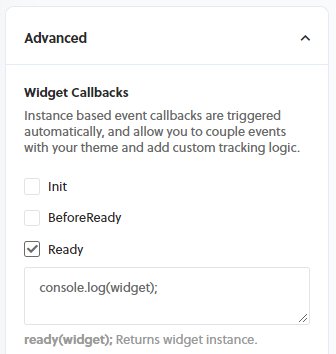
All methods below are as if there is a reference to a specific widget such as the snippet below or if the code snippet is in one of the widget callbacks from the widget settings page under the Advanced settings such as the image below.
Widget referenceconst widget = window.Rebuy.widgets[0];
addSelectedProductsToCart
This function is used with the Product Add-Ons widget. This adds the items that are selected from the widget to the cart.
widget.addSelectedProductsToCart(data, callback);
addToCart
Makes a post request to Shopify API to add an item to the cart. The first argument expects a product object.
widget.addToCart(product, callback);
addToReChargeCheckout
Used by the Recharge Checkout widget to add the item object passed in as the first argument and will update the checkout UI.
widget.addToReChargeCheckout(product, callback);
Returns a boolean (true) if the item passed in as an argument has been added by the specified widget that is calling the method.
widget.cartItemIsWidgetItem(item);
checkout
When this function is called, the customer will be redirected to the checkout page.
compareAtSubtotal
Used by the Dynamic Bundle and Product Addons widgets to generate a compare at price if there is a discount for any of the applicable products
widget.compareAtSubtotal();
declineOffer
Used by the Upsell, Thanks You Page and Switch to Subscription popup type widgets when the customer does not want to accept the offer from presented.
widget.declineOffer(product, callback);
destroy
This function will destroy and remove the widget, including the root div, at the given index. This function calls hide, detachWidget and unbindEvents.
widget.destroy(callback);
This function removes the widget from the DOM as well as removes it from the array of widget from window.Rebuy.widgets.
getCartProductIDs
Returns an array of numbers which are the product ID's of the products in the cart.
widget.getCartProductIDs();
getCartVariantIDs
Returns an array of numbers which are the variant ID's of the products in the cart.
widget.getCartVariantIDs();
getVariantIDs
Returns an array of numbers which are the variant ID's of the items in the cart. Take an optional boolean (join) as an argument and when true will join as a comma separated string instead of an array of numbers.
widget.getVariantIDs(join);
This method will force the widget to fetch new products via the API, and accepts an optional callback function. This is useful if you'd like to update product or variant IDs associated with the widget and then fetch a new API response. In practice, you could update the variant ID based on a customer's interaction with the product page form and fetch variant-specific recommendations.
JavaScriptwidget.getWidgetProducts(callback):
Examples// Set Shopify variant IDs
widget.data.shopify_variant_ids = [1234567890];
// Fetch new data with the updated variant IDs
widget.getWidgetProducts(()=>{
console.log("New products fetched!");
});
Returns a boolean (true) when the widgets quantity input setting is enabled.
widget.hasQuantityInputEnabled();
hasTimer
Returns a boolean (true) when the widgets timer setting is enabled.
hide
Used by Popup type widgets and will close the widget when this method is called.
Returns a boolean (true) when the widget is a cart based widget as opposed to a product page widget.
widget.isCartBasedWidget();
productIsSelected
Used by the Dynamic Bundle and Product Addons widgets. Returns a boolean (true) when the checkbox is selected.
widget.productIsSelected(product);
removeFromCart
Original use case: Used by the Shopify checkout and Recharge checkout widget to remove an item from the cart that has been added by the widget. When in checkout, if an item is added by a Rebuy checkout widget then the item will have a (remove) button below it. This way, if the item was added accidentally the customer does not need to navigate back to the cart page to adjust the item that was added.
widget.removeFromCart(product, callback);
render
When this method is called and the widget should display based off the connected rules then it will render by creating a new Vue instance for the widget.
selectedProductCount
Used by the Product Addon and Dynamic bundle widget. Returns a number which is the amount of products that are currently selected.
widget.selectedProductCount();
shouldDisplay
Returns a boolean (true) if the widget should display according to the connected data source.
show
This method will make a popup type widget display when it is called. The popup widget can be set to trigger manually via the widgets settings object and then could be triggered to display according to custom logic as needed.
Examplewidget.data.pop_up_trigger = "manual";
if ("some custom logic") {
widget.show();
}
Product & Variant Methods
getProductIDs
Returns an array of Shopify product IDs associated with the widget. Takes an optional boolean argument; when true, returns a comma-separated string instead of an array.
widget.getProductIDs(); // [123456, 789012]
widget.getProductIDs(true); // "123456,789012"
getCollectionIDs
Returns an array of Shopify collection IDs associated with the widget. Takes an optional boolean argument; when true, returns a comma-separated string.
widget.getCollectionIDs(); // [987654321]
widget.getCollectionIDs(true); // "987654321"
productAvailable
Returns a boolean indicating whether at least one variant of the product is available for purchase.
widget.productAvailable(product); // true or false
variantAvailable
Returns a boolean indicating whether a specific variant is available for purchase based on inventory policy and quantity.
widget.variantAvailable(variant); // true or false
variantPrice
Returns the price for a variant, accounting for any widget discounts, subscription discounts, and currency localization. If no variant is provided, uses the lowest-priced variant.
widget.variantPrice(product, product.selected_variant);
variantCompareAtPrice
Returns the compare-at price for a variant, used to show the original price when a discount is applied.
widget.variantCompareAtPrice(product, product.selected_variant);
variantOnSale
Returns a boolean indicating whether a variant is on sale (has a discount or compare-at price higher than current price).
widget.variantOnSale(product, product.selected_variant); // true or false
Subscription Methods
hasSubscription
Returns a boolean indicating whether a product has subscription options available.
widget.hasSubscription(product); // true or false
hasSubscriptionDiscount
Returns a boolean indicating whether a product has a subscription discount configured.
widget.hasSubscriptionDiscount(product); // true or false
toggleSubscription
Toggles the subscription state of a product. If the product has a subscription and is set to one-time, switches to subscription. If already subscribed, switches to one-time.
widget.toggleSubscription(product);
selectSubscription
Selects subscription purchase for a product. Optionally accepts a frequency parameter.
widget.selectSubscription(product);
widget.selectSubscription(product, 30); // 30-day frequency
selectOnetime
Selects one-time purchase for a product (disables subscription).
widget.selectOnetime(product);
Cart Observation
watchCart
Registers an event listener that triggers when the cart changes. Useful for updating widget products when cart contents change. The callback receives the updated products array.
widget.watchCart(function(products) {
console.log("Cart changed, products updated:", products);
});
unwatchCart
Removes the cart change event listener registered by watchCart.
cartHasProduct
Returns a boolean indicating whether the cart contains a specific product.
widget.cartHasProduct(product); // true or false
Bundle & Add-On Methods
selectProduct
Used by Dynamic Bundle and Product Add-Ons widgets. Marks a product as selected.
widget.selectProduct(product);
unselectProduct
Used by Dynamic Bundle and Product Add-Ons widgets. Marks a product as unselected.
widget.unselectProduct(product);
toggleProductSelect
Toggles the selection state of a product. If selected, unselects it; if unselected, selects it.
widget.toggleProductSelect(product);
subtotal
Used by Dynamic Bundle and Product Add-Ons widgets. Returns the subtotal in cents for all selected products.
widget.subtotal(); // 2500 (represents $25.00)
bundleOnSale
Returns a boolean indicating whether the bundle has a discount (subtotal is less than compare-at subtotal).
widget.bundleOnSale(); // true or false
bundleSavings
Returns the savings amount in cents (difference between compare-at subtotal and current subtotal).
widget.bundleSavings(); // 500 (represents $5.00 savings)
Used by Dynamic Bundle widgets. Returns true when the widget's display type is popup. The template gates popup-only chrome on it (modal close button, "Powered by Rebuy" footer) instead of reading config.display_type inline, so copied custom templates keep working when the setting changes.
widget.isPopupDisplay(); // true or false
showBundleImages
Used by Dynamic Bundle widgets. Controls the top image strip (.rebuy-bundle__images). Embeds always render it; popups render it only for the List layout, since the Stacked and Horizontal layouts show per-card images instead.
widget.showBundleImages(); // true or false
Used by Dynamic Bundle widgets. Controls the per-card product image (.rebuy-product-media). Renders for the popup's Stacked and Horizontal layouts only; List keeps imageless text rows and embeds never render card media.
widget.showBundleCardMedia(); // true or false
showBundleSavings
Used by Dynamic Bundle widgets. Returns true when the "You save $X" line should render below the bundle price — popup display only, and only when the bundle is on sale.
widget.showBundleSavings(); // true or false
Used by Dynamic Bundle widgets. Returns true when the Continue (decline) button renders in the bundle footer — popup display only, further gated by the widget's "Show continue button" setting.
widget.showBundleContinueButton(); // true or false
continueLabel
Returns the label for the Continue button from the widget's language settings.
widget.continueLabel(); // "Continue"
bundleItemsClasses
Used by Dynamic Bundle widgets. Returns the class list for the bundle items container (.rebuy-bundle__items). Popups receive the generic rebuy-product-grid column classes for the current layout; embeds receive an empty list. Carousel classes are never emitted — the bundle template does not support carousels.
widget.bundleItemsClasses(); // ['rebuy-product-grid', 'rebuy-product-grid-large-3', ...]
---
title: Methods
excerpt: JavaScript methods for controlling widget display and cart interactions
deprecated: false
hidden: false
metadata:
title: ''
description: ''
robots: index
next:
description: ''
---
The widget methods are scoped to each widget specifically. The widgets are placed in an array nested within the global Rebuy object so when using methods for a specific widget you can use the Array.find() function (example below) or any other array function that you prefer.
This is not a complete list of the globally available function but the ones that we find most helpful.
```javascript title="Find widget"
const widget = window.Rebuy.widgets.find(widget => widget.id === "1234");
```
All methods below are as if there is a reference to a specific widget such as the snippet below or if the code snippet is in one of the widget callbacks from the widget settings page under the Advanced settings such as the image below.
```javascript title="Widget reference"
const widget = window.Rebuy.widgets[0];
```

## addSelectedProductsToCart
This function is used with the Product Add-Ons widget. This adds the items that are selected from the widget to the cart.
```javascript
widget.addSelectedProductsToCart(data, callback);
```
## addToCart
Makes a post request to Shopify API to add an item to the cart. The first argument expects a product object.
```javascript
widget.addToCart(product, callback);
```
## addToReChargeCheckout
Used by the Recharge Checkout widget to add the item object passed in as the first argument and will update the checkout UI.
```javascript
widget.addToReChargeCheckout(product, callback);
```
## cartItemIsWidgetItem
Returns a boolean (true) if the item passed in as an argument has been added by the specified widget that is calling the method.
```javascript
widget.cartItemIsWidgetItem(item);
```
## checkout
When this function is called, the customer will be redirected to the checkout page.
```javascript
widget.checkout();
```
## compareAtSubtotal
Used by the **Dynamic Bundle** and **Product Addons** widgets to generate a compare at price if there is a discount for any of the applicable products
```javascript
widget.compareAtSubtotal();
```
## declineOffer
Used by the **Upsell**, **Thanks You Page** and **Switch to Subscription** popup type widgets when the customer does not want to accept the offer from presented.
```javascript
widget.declineOffer(product, callback);
```
## destroy
This function will destroy and remove the widget, including the root div, at the given index. This function calls hide, detachWidget and unbindEvents.
```javascript
widget.destroy(callback);
```
## detachWidget
This function removes the widget from the DOM as well as removes it from the array of widget from window\.Rebuy.widgets.
```javascript
widget.detachWidget();
```
## getCartProductIDs
Returns an array of numbers which are the product ID's of the products in the cart.
```javascript
widget.getCartProductIDs();
```
## getCartVariantIDs
Returns an array of numbers which are the variant ID's of the products in the cart.
```javascript
widget.getCartVariantIDs();
```
## getVariantIDs
Returns an array of numbers which are the variant ID's of the items in the cart. Take an optional boolean (join) as an argument and when true will join as a comma separated string instead of an array of numbers.
```javascript
widget.getVariantIDs(join);
```
## getWidgetProducts
This method will force the widget to fetch new products via the API, and accepts an optional callback function. This is useful if you'd like to update product or variant IDs associated with the widget and then fetch a new API response. In practice, you could update the variant ID based on a customer's interaction with the product page form and fetch variant-specific recommendations.
```coffeescript title="JavaScript"
widget.getWidgetProducts(callback):
```
```coffeescript title="Examples"
// Set Shopify variant IDs
widget.data.shopify_variant_ids = [1234567890];
// Fetch new data with the updated variant IDs
widget.getWidgetProducts(()=>{
console.log("New products fetched!");
});
```
## hasQuantityInputEnabled
Returns a boolean (true) when the widgets quantity input setting is enabled.
```javascript
widget.hasQuantityInputEnabled();
```
## hasTimer
Returns a boolean (true) when the widgets timer setting is enabled.
```javascript
widget.hasTimer();
```
## hide
Used by **Popup** type widgets and will close the widget when this method is called.
```javascript
widget.hide();
```
## isCartBasedWidget
Returns a boolean (true) when the widget is a cart based widget as opposed to a product page widget.
```javascript
widget.isCartBasedWidget();
```
## productIsSelected
Used by the Dynamic Bundle and Product Addons widgets. Returns a boolean (true) when the checkbox is selected.
```javascript
widget.productIsSelected(product);
```
## removeFromCart
Original use case: Used by the Shopify checkout and Recharge checkout widget to remove an item from the cart that has been added by the widget. When in checkout, if an item is added by a Rebuy checkout widget then the item will have a (remove) button below it. This way, if the item was added accidentally the customer does not need to navigate back to the cart page to adjust the item that was added.
```javascript
widget.removeFromCart(product, callback);
```
## render
When this method is called and the widget should display based off the connected rules then it will render by creating a new Vue instance for the widget.
```javascript
widget.render();
```
## selectedProductCount
Used by the Product Addon and Dynamic bundle widget. Returns a number which is the amount of products that are currently selected.
```javascript
widget.selectedProductCount();
```
## shouldDisplay
Returns a boolean (true) if the widget should display according to the connected data source.
```javascript
widget.shouldDisplay();
```
## show
This method will make a **popup** type widget display when it is called. The **popup** widget can be set to trigger manually via the widgets settings object and then could be triggered to display according to custom logic as needed.
```javascript
widget.show();
```
```javascript title="Example"
widget.data.pop_up_trigger = "manual";
if ("some custom logic") {
widget.show();
}
```
---
## Product & Variant Methods
### getProductIDs
Returns an array of Shopify product IDs associated with the widget. Takes an optional boolean argument; when `true`, returns a comma-separated string instead of an array.
```javascript
widget.getProductIDs(); // [123456, 789012]
widget.getProductIDs(true); // "123456,789012"
```
### getCollectionIDs
Returns an array of Shopify collection IDs associated with the widget. Takes an optional boolean argument; when `true`, returns a comma-separated string.
```javascript
widget.getCollectionIDs(); // [987654321]
widget.getCollectionIDs(true); // "987654321"
```
### productAvailable
Returns a boolean indicating whether at least one variant of the product is available for purchase.
```javascript
widget.productAvailable(product); // true or false
```
### variantAvailable
Returns a boolean indicating whether a specific variant is available for purchase based on inventory policy and quantity.
```javascript
widget.variantAvailable(variant); // true or false
```
### variantPrice
Returns the price for a variant, accounting for any widget discounts, subscription discounts, and currency localization. If no variant is provided, uses the lowest-priced variant.
```javascript
widget.variantPrice(product, product.selected_variant);
```
### variantCompareAtPrice
Returns the compare-at price for a variant, used to show the original price when a discount is applied.
```javascript
widget.variantCompareAtPrice(product, product.selected_variant);
```
### variantOnSale
Returns a boolean indicating whether a variant is on sale (has a discount or compare-at price higher than current price).
```javascript
widget.variantOnSale(product, product.selected_variant); // true or false
```
---
## Subscription Methods
### hasSubscription
Returns a boolean indicating whether a product has subscription options available.
```javascript
widget.hasSubscription(product); // true or false
```
### hasSubscriptionDiscount
Returns a boolean indicating whether a product has a subscription discount configured.
```javascript
widget.hasSubscriptionDiscount(product); // true or false
```
### toggleSubscription
Toggles the subscription state of a product. If the product has a subscription and is set to one-time, switches to subscription. If already subscribed, switches to one-time.
```javascript
widget.toggleSubscription(product);
```
### selectSubscription
Selects subscription purchase for a product. Optionally accepts a frequency parameter.
```javascript
widget.selectSubscription(product);
widget.selectSubscription(product, 30); // 30-day frequency
```
### selectOnetime
Selects one-time purchase for a product (disables subscription).
```javascript
widget.selectOnetime(product);
```
---
## Cart Observation
### watchCart
Registers an event listener that triggers when the cart changes. Useful for updating widget products when cart contents change. The callback receives the updated products array.
```javascript
widget.watchCart(function(products) {
console.log("Cart changed, products updated:", products);
});
```
### unwatchCart
Removes the cart change event listener registered by `watchCart`.
```javascript
widget.unwatchCart();
```
### cartHasProduct
Returns a boolean indicating whether the cart contains a specific product.
```javascript
widget.cartHasProduct(product); // true or false
```
---
## Bundle & Add-On Methods
### selectProduct
Used by **Dynamic Bundle** and **Product Add-Ons** widgets. Marks a product as selected.
```javascript
widget.selectProduct(product);
```
### unselectProduct
Used by **Dynamic Bundle** and **Product Add-Ons** widgets. Marks a product as unselected.
```javascript
widget.unselectProduct(product);
```
### toggleProductSelect
Toggles the selection state of a product. If selected, unselects it; if unselected, selects it.
```javascript
widget.toggleProductSelect(product);
```
### subtotal
Used by **Dynamic Bundle** and **Product Add-Ons** widgets. Returns the subtotal in cents for all selected products.
```javascript
widget.subtotal(); // 2500 (represents $25.00)
```
### bundleOnSale
Returns a boolean indicating whether the bundle has a discount (subtotal is less than compare-at subtotal).
```javascript
widget.bundleOnSale(); // true or false
```
### bundleSavings
Returns the savings amount in cents (difference between compare-at subtotal and current subtotal).
```javascript
widget.bundleSavings(); // 500 (represents $5.00 savings)
```
### isPopupDisplay
Used by **Dynamic Bundle** widgets. Returns `true` when the widget's display type is `popup`. The template gates popup-only chrome on it (modal close button, "Powered by Rebuy" footer) instead of reading `config.display_type` inline, so copied custom templates keep working when the setting changes.
```javascript
widget.isPopupDisplay(); // true or false
```
### showBundleImages
Used by **Dynamic Bundle** widgets. Controls the top image strip (`.rebuy-bundle__images`). Embeds always render it; popups render it only for the List layout, since the Stacked and Horizontal layouts show per-card images instead.
```javascript
widget.showBundleImages(); // true or false
```
### showBundleCardMedia
Used by **Dynamic Bundle** widgets. Controls the per-card product image (`.rebuy-product-media`). Renders for the popup's Stacked and Horizontal layouts only; List keeps imageless text rows and embeds never render card media.
```javascript
widget.showBundleCardMedia(); // true or false
```
### showBundleSavings
Used by **Dynamic Bundle** widgets. Returns `true` when the "You save $X" line should render below the bundle price — popup display only, and only when the bundle is on sale.
```javascript
widget.showBundleSavings(); // true or false
```
### showBundleContinueButton
Used by **Dynamic Bundle** widgets. Returns `true` when the Continue (decline) button renders in the bundle footer — popup display only, further gated by the widget's "Show continue button" setting.
```javascript
widget.showBundleContinueButton(); // true or false
```
### continueLabel
Returns the label for the Continue button from the widget's language settings.
```javascript
widget.continueLabel(); // "Continue"
```
### bundleItemsClasses
Used by **Dynamic Bundle** widgets. Returns the class list for the bundle items container (`.rebuy-bundle__items`). Popups receive the generic `rebuy-product-grid` column classes for the current layout; embeds receive an empty list. Carousel classes are never emitted — the bundle template does not support carousels.
```javascript
widget.bundleItemsClasses(); // ['rebuy-product-grid', 'rebuy-product-grid-large-3', ...]
```